Thursday, February 28, 2008

Resize the virtual harddisk size

As a developer, I need to test the applications written in different version of Windows OSs, sometimes also need to try out the new beta products, and of course, to run the application without the Vista's UAC. I need to cultivate the environment for simple virus as well (very dangerous for a beginner like me). I like to use Virtual PC since i can get all these advantages.

If the disk space is running out, the virtual OS will keep notifying you to clean up more space. It is quite annoying to clean up the space to move on.With the VHD Resizer, you can add more space to extend the life span of your virtual environment.

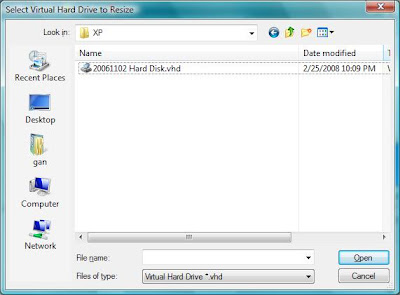
1. After download and install the VHD Resizer, you will be greeted with Open File Dialog:

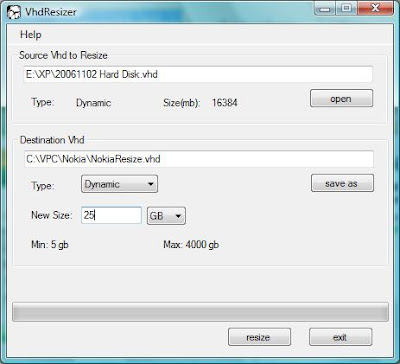
2. then you will come to the VHD Resizer main UI, insert the new vhd file you want with the new file size, the disk space allocation will start.
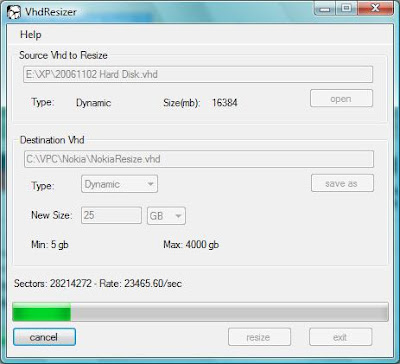

3. After minutes, the allocation will finish. But your job is not done yet. You would not get the result instantly. You need to go to Disk Management and partition the new disk space.
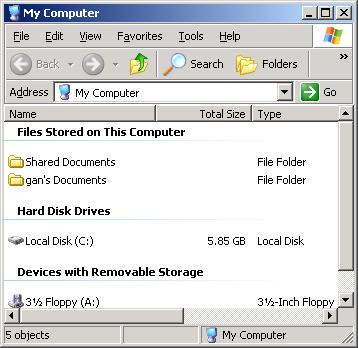
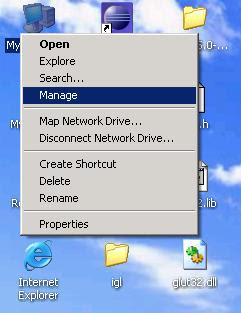
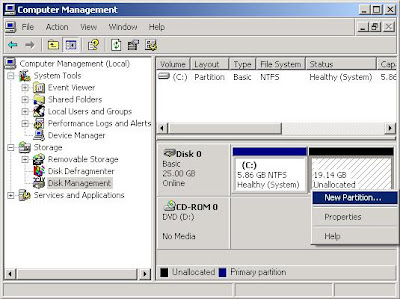

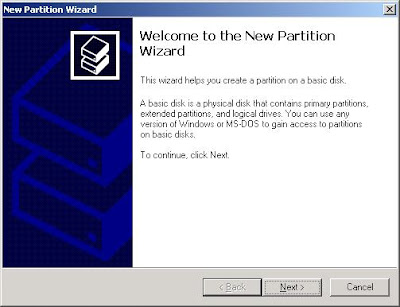
4. You will be greeted another wizard : New Partition Wizard. Use the default values for each settings.
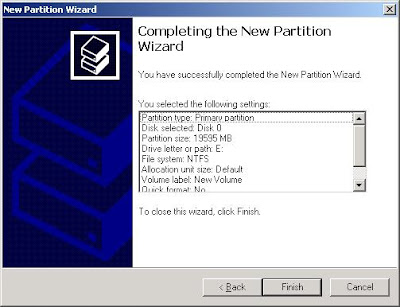

5. The disk formatting will be completed fast and easily.
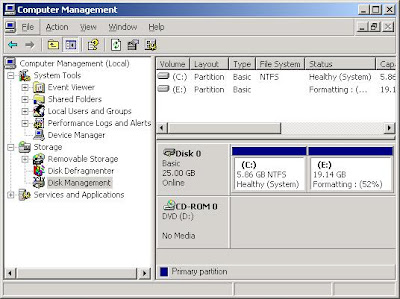


6. The actual file size for the vhd resized is not increased tremendously, I think 70 MB is used for partition the disk space, since later the hard disk space will expand dynamically.

7. Done. You will be freed from the virtual disk space problem!

Monday, February 18, 2008

Little Update for C# Clock widget

Several months after posting the C# Clock widget on CodeProject, finally I managed to add some useful features into it. There are:

1) Customizable/Load and save user settings. User will be able to customize the application based on the feature they like, and it will load also on every start. In this case, the color of the hands and alarm message. (Part of the UI design refers from CodingForFun)


2) Localization, although it will no longer standalone (it will need satellite assemblies for localization). Currently it supports english and simplified chinese, other locales will fall back the english version though.


3) Alarm. User can enable the alarm so that this widget will notify the user on certain occasion.

4) Call the system clock. This is a context-menu to summon the system clock, maybe it's redundant, since user can by-pass it through the taskbar

You can get the source-code and installer here.

Monday, February 4, 2008

550: Access is denied. Why cannot delete files on FTP server?

FTP is quite popular for transfering the large files since old days. One of the problem that I face previously is this: 550 (foo.txt) : Access is denied, when issuing a delete command from application on client side.

After looking the setting level for the FTP at IIS, I found the user has the right to read/write, but this problem still happens on issuing a delete command. I wonder what went wrong???


A check on the file properties on the server side, I found this file has a read-only attribute!

By modifying the attribute, the delete command is able to delete the file again. I think the application on client side does not have the ability to check the file's attribute, at least for Windows FTP service (Unix should have such ability, using: ls -l ). So the workout is the server side must set the attribute implicitly, through FileAttributes Enumeration.


Friday, January 25, 2008

Reflector Addins

Last blog, I talked about the Reflector. After looking for more tool to smooth the work flow of debugging task, I found there are several add-ins that can make you life easier. Scott Hanselman even compiled the list of Codeplex-hosted add-ins in his site.
Well, I personally like the Diff and FileDisassembler, another add-in which is not hosted at the CodePlex. Diff is a tool that act like Windiff to your file compare, but it's used for assembly compare; while the FileDisassembler allows you to reverse-engineer the assembly to the source file, in case you loss your source code (and of course, if you wanna see how people code :-D), althought it might not 100% identical to the original code. (But hey, what you can ask for, since it is free!)

(Image from Reflector.FileDisassembler)

Must-have and go get it!

Sunday, January 13, 2008

Encryption is not safe in .Net, even it encrypts 128-bit blocks, if you do normal compilation!

With the release of .Net Reflector from Lutz Roeder, even dummy developer can de-compile your 10-years-effort application within seconds. It has become a open secret in the NET developers group and I think this is the main reason Microsoft releases some of the source code of framework libraries, although they often claim .NET is open architecture.

Reverse-engineering of your application is possible, when your source code is not obfuscated. For security purpose, developer maybe will use cryptographic services to encrypt user name & password and store it in clients'(users themselves) PC for reloading purpose. (So the application can log-in again for the same user without asking user name & password). This kind of information often could be a .ini/.config/.xml or any other ASCII file.

Cryptographic services help your client stores private and confidential information from others. The higher the bits used to perform encryption/decryption, the more difficult the hackers can hack your code. But now the problem is not coming from the algorithm but the .NET itself, if you are writing normal codes without obfuscating it.

Let's have a sample from MSDN using RijndaelManaged Class:
(The demo here is to urge the developers to tighten-up the security, not to encourage hackers!)


2) Browse to the .NET application you wish to de-compile. Drag-and-drop it to the .Net Reflector. (Sample provided; remove the "Config.ini" file to re-generate)

3) Browse to the default namespace. You might ask: How do you know it is default namespace? Normally it is same name with the application. If not sure, just browse one-by-one, since you can de-compile all the them :-D


4) Browse to default class. You might ask again: How do you know it is default class? Same answer with step (3).

Browse to default form/module. You might ask for 3rd time: How do you know it is default form/module? For C#, normally developers will name it as frmMain/frmMDI/frmLogin. In VB .Net, the entry point should be modmain module. Else, just follow step (3) :-)


5) Until here, maybe you have no choice but to look into all the possible methods (sometimes you can find the possible method like : frmLogin_Load, btnLogin_Click, etc). Click the methods to check the disassembler in the right pane.

Now you can see the user name & password are decrypted, before they are used to validate/compare with the user input.


6) Remember the configuration file in the form constructor. It's useful later to find out the where the encrypted information stored.


7) Click on the any method on the disassembler pane to drill down. If it requires additional assembly, message box will be prompted. Just click OK.


8) Again, Click on the method on the disassembler. You can find the decryption method. It uses Rijndael algorithm.


9) Oh, my God! It comes with IV and key, embeded in the application.

10) Copy decryption method, IV, key and build a simple console application. (Sample provided)

11) Pass-in the encrypted string to the console application built previously.
Done! Now you are a hacker! Oops, sorry, I meant you must tighten-up you source code compilation for security purpose.

p/s: Even in java, there're tons of de-compiler tools available. It's not surprise, since .NET is modeling from Java.