Showing posts with label IIS. Show all posts

Wednesday, June 4, 2014

"HTTP Error 401.3 - Unauthorized" on a unity web player page?

Recently, i involved in a project that has to rush to deploy. Since I work in mobile game company, some games have to be able to run in web browser as well. Unity web player usually would be generated by Unity along with a html page, my task was just to link to that page. So, I uploaded the zipped game content using FileZilla to the Azure server.

To host in IIS 7.5, and allow ".unity3d" to be downloaded is not an issue, what you need to add is new MIME, as explain here.


Easy, huh? I thought so. Then I browse to my page.
Kaboom!

HTTP Error 401.3 - Unauthorized

You do not have permission to view this directory or page because of the access control list (ACL) configuration or encryption settings for this resource on the Web server.


I just did what's considered normal process, right? As rushing for live, I was cracking my head and wonder what went wrong. Goggling on internet gave me no result which could link error 401.3 with Unity web player. After few hours of trial-and-error, 2 workarounds came into my mind:

1) Permissions and user rights : I have tried to give full-rights on the folder, but failed.
2) Thinking to write code on Asp.net Impersonation, but it invites security concerns.

Suddenly, I found something special:


Hey, why the file name is in green color?
And another googling on this, I found out that:
Green means encrypted, blue means compressed in Windows.

The resolution is:
1) Right-click the file, click "Properties"


2) Click the "Advanced.." button.


3) On the "Compress or Encrypt attributes" section, un-check the "Encrypt contents to secure data"


After the decryption, the text becomes normal black color.


And refresh the browser again, it's ok.


I found out that:
1) when i uploaded the zipped content thru' FileZilla, then this encryption will happen. It must be caused by the FTP issue.
2) when i uploaded the extracted content thru' FileZilla, no issue.


Friday, March 8, 2013

"The process cannot access the file because it is being used by another process"

There'll be time when you need to enabling SSL on IIS 7.0 Using Self-Signed Certificates.
RobBagbyscottgu has 2 great tutorials on that topic. Looks like IIS7 simplify a lots.
I go to IIS and set the binding using the default port 443.


But life is not always a bed of roses.Then I hit this error message:
"There was an error while performing this operation."
"The process cannot access the file because it is being used by another process. (Exception from HRESULT: 0x80070020)"


I was wonder what caused it to happen  After confirmed with network guy it's not their issue, i have to check what could be the possible reason for that.
From Microsoft Support, and also someone from stack-overflow pointed out this could be port is being used by other application.

Then I work it out from there:
1) run the "netstat" command from command prompt, to display active TCP connections, ports on which the computer is listening


2) then run the "Tasks Manager". The PID column is not displyed by default. I have to go to "View">"Select Column" and check it.


3) Compare the PID.

4) there's another process, called "nhttp.exe" is using that port. It's from Lotus Domino. :(


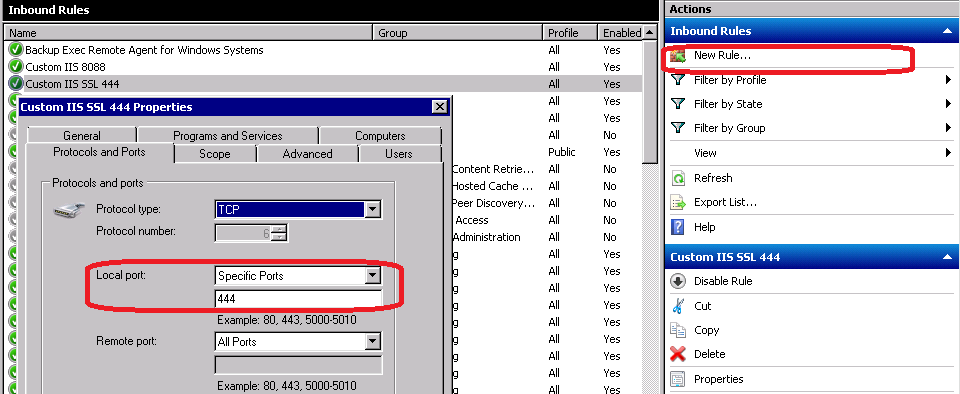
5) no choice but have to use another port 444. Back to the IIS site binding, and edit it.

6) of course, have to allow the firewall to let that port through by adding a new inbound rule.


7) Finally, I can browse my site.