Recently I have a try on Android Wear in the workshop, using the sample given from Google IO. I downloaded the sample and followed the instructions given.
Error:Error: com.android.ide.common.process.ProcessException: org.gradle.process.internal.ExecException: Process 'command 'C:\Users\gan\AppData\Local\Android\sdk\build-tools\21.1.2\aapt.exe'' finished with non-zero exit value 42
on this file:
C:\Users\gan\Desktop\gan\project\AndroidStudio\android-codelab-watchface-master\android-codelab-watchface-master\1-base\build\intermediates\exploded-aar\com.google.android.gms\play-services-base\6.5.87\res\drawable-xhdpi\common_signin_btn_text_focus_light.9.png ERROR: Unable to open PNG file
However, other people using SDK version 21 ran fine without error. It is quite weird. Some said it's SDK issue, some said it's gradle issue. I have tried few of them but no luck. I also thought it could be this "C:\Users\gan\AppData\Local\Android\sdk\build-tools\21.1.2\aapt.exe" file having execution-right issue, but running it from command-line found no issue at all.
I was suggested by instructor, that it could be this image "common_signin_btn_text_focus_light.9.png" was the main culprit. So I was intended to replace with another dummy image. After finding a new dummy file and when I tried to replace it, I was getting another error message from Windows: "Destination Path Too Long"
From previous post, now we can proceed to test on the Android device. If you are directly generated the APK, then you are wrong (partially. If your device does not has Facebook app, then it works fine mostly, but it'll not work if other way round)
1) Make sure you have Android SDK installed. Go to Unity Editor, click on "Build Settings"
2) Add the interactive scene, and click "Android" platform, then click "Player Settings ...". Configure the "Company Name", "Product Name, and "bundle identifier"
3) Click "Build" button in "Build Settings" to generate APK file.
5) After installation is done, launch the app you installed. Click the "FB.Init" and follow by "Login". Everything should be fine.
6) But if you install Facebook app in your device and run the sample interactive apk. This time will fail.
7) To generate the debug log (idea is from here; You might need these tools: adb, logcat), connect your device to laptop with cable, and run this in command prompt:
$ adb logcat -d > logcat.txt
then start the app in device again. Repeat the login process until you hit the login error. Then press Ctrl-C to stop the logging in command prompt.
8) I saw this message "Login cancelled by player" in the log captured. By printing the keyHash sent to server, then I realized it was caused by missing keyhash.
9) To run in Andoid, you need to get a keyhash. To get a keyhash, you need OpenSSL.
If you are on Windows, you need to install OpenSSL. If you use 64-bit Windows, download and install "Win64 OpenSSL v1.0.2a". If you use 32-bit Windows, download and install "Win32 OpenSSL v1.0.2a". Make sure you configure the "PATH" variable in "Environment Variables" too. I get the idea here.
(I was reported this step is not needed in MacOS.)
10) Restart the Unity Editor, Click on "Facebook" menu. This time you go to: "Android Build Facebook Settings". You see the "Debug Android Key Hash" automatically now.
*If you found out you see nothing in the "Debug Android Key Hash" then you probably miss the above step (9), it is needed, as in GetKeyHash() function in "~\Assets\Facebook\Editor\android\FacebookAndroidUtil.cs"(see more here)
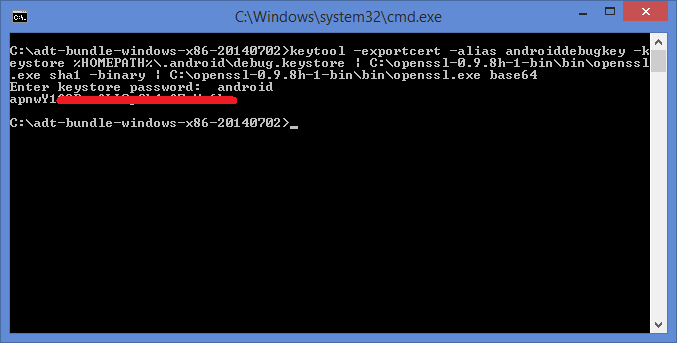
* Execute the command can see the same result too(you can use OpenSSL version 0.9.8h too):
default password for debugging purpose is: android
11) This time, I built the APK file and run again in device. Still failed. From the debug log, this time I get:
OnLoginComplete({"cancelled":true})
12) I have to go to Facebook developer page again (the one you created early to get the AppId) to add configuration for Android. (got the idea here) Go to "Settings" and click "Add Platform".
13) Choose "Android"
14) Copy all the values "Package Name", "Class Name" and "Debug Android Key Hash" from Unity Editor and paste in the new "Android" setting.
15) Build the APK again and run from device. This time everything is OK, even with Facebook app installed. (this time the the login pop up will be from Facebook app)
Recently I switch my focus a bit more to game development. Unity is quite a popular tool now, since you can focus more on game design, and it runs more than 20 platforms. Facebook has release SDK for it as well, so game developer can easily integrate social feature into the game.
Though it runs on multiple platforms, there's something to be done specifically on certain platform. One of it is Android OS.
If your Android device has no Facebook app installed, everything is as smooth as silk, but it you has Facebook app installed, your problem comes. There's few helpful videos in Facebook sdk website, however to make it works for almost all circumstances, there's few extra steps to be done. Let's start with basic stuffs first.
1) Go to download the latest Facebook-SDK for Unity, at the time of writing it's 6.2.2.
2) Launch Unity 5 and create a new empty project. Import the Facebook-SDK for Unity ("FacebookSDK-150414_6.2.2.unitypackage")
3) The Facebook-SDK for Unity comes with an interactive scene. Go to "Assets>Examples", open the "InteractiveConsole.unity" scene. This is the place you can test all the Facebook APIs, before integrate it with your game.
4) To run this in Editor, there's few setup you need to do, as describe it the SDK.
5) First, go to "https://developers.facebook.com/apps/" and on top menu, click "My Apps">"Add a New App".
6) Go to "Advanced setup" for familiar the whole picture.
7) Create a new app id.
8) You should be brought to the dashboard of the new app you created. You have "App ID" and "App Secret" given, and you need these info later.
9) Go to "Settings", and key-in your email address.
10) Go to "Status & Review", and make it public. Now these are all the steps to make Facebook SDK run on Unity Editor, but more to come to make it run in Android later.
11) Go back to Unity Editor of the project you created just now. By importing the Facebook-SDK for Unity, you should have a "Facebook" menu right now. Click on it, and you should see something in "Inspector" pane. Copy the "App ID" from step (8) and paste in the Inspector section.
12) Click "Play" and you should see the "Game" section is active by now. Click on the "FB.Init" button.
13) Click the "Login" button, if your AppID is correct. You can see the AppID you pass to Facebook server in the status pane at the top.
14) In Unity Editor, you will be greeted with another pop-up, click "Find Access Token" to get a valid "User Access Token". Don't worry, this screen will be replaced with Facebook login in actual device.
15) It will trigger you default OS browser, and see it supplies along with "AppID" again.
16) For the first-time, you will need to grant permission to gain access. Click that hyperlink in the "User Token" section.
17) Then it'll tell you the token is created. Click "Continue".
18) You will be brought back to previous page, but this time with "User Access Token". Copy this "User Token" value.
19) Paste it in the Unity Editor dialog in step (14) just now.
20) More button will be revealed in the Editor, if the token is valid. Now you are official logged-in. Feel free to try other function.
We proceed to test on Android device testing in another page.
Recent trend saw the rise of mobile technology. In order to accommodate it, websites have to cater mobile users as well. Bootstrap, the most popular front-end framework for developing responsive, has take to web development to a more elegant way. At the same time, Icon Font has rode along the wave. Two major popular clans of Icon Font is Glyphicons & Font Awesome. Icon Font comes with a lots of benefits, eg, size, color, shape. Why it has such advantages? Reads more.
I involved in a website, where one of the requirement is to create Folder-like html nested lists. There's some trick to do it, some have introduced at:
1) using image (simple)
So far no issue, but to apply them on HTML with bootstrap, it really takes a bit extra of time, especially for those people that are not good in CSS, like me. I was looking fast-and-clean approach, something like CSS Icon Fonts, but built-in Glyphicons & Font Awesome does not come with it, Goggling other existing icon font also yields no result.
Then I bumped into this website, fontastic, prompting the idea of creating my Icon Font. From here, I found out that it needs .svg file to create icon font. SVG defines graphics in XML format. Now you know why Icon Font can be sized, since it's vector image. Thus I pick-up the tool, svg-edit, I used before in this post, and start creating the asset. Let's begin.
1) Download the "svg-edit", extract the zip file and click "svg-editor.html" to load the editor.
2) You'll be welcomed with default blank canvas. Click on the "Rectangle".
3) Try to create something like this. As you can see, I create the vertical rectangle over the size of the canvas. If i create with exact fit, it'd be far too small when Icon Font generated later, could be padding or margin issue. Try it yourself. And I found out that the color does not matter now.
4) When you done, save the file, let's say "m.svg". You can click on the "SVG", and reveal the svg content.
5) Now the asset is done. Let's go to create the Icon Font at fontastic.
6) Select "Modify Font" if it default to it, else create new font.
7) Give a descriptive name, this will be the name use in html.
8) Now we import the "m.svg" created early.
9) Import successful!
10) Preview of our Icon Font. It still looks weird, huh? Bear for while, click "Change set name".
11) Change the set name
12) Click this set to add to your font, and you can see you have "1" ready to publish.
13) Click "Publish" tab and click the "Manual Download" button.
14) Now you can prepare to add it to your HTML. Let's use one of the very nice bootstrap menu library, metisMenu.
15) Download it's js library and sample. Add these few lines into the sample html provided by metisMenu.
This CSS is for adding extra second-level indentation.
Add this HTML to all the nested list "li" , and it is for adding the Icon Font generated.
16) Yeah, a nice folder-like html nested lists you got by now! You can download the source here.
p/s: When you use this Icon Font in Google Chrome browser, you might experience some weird issue. I think Google Chrome use some scaling technique to adjust the web content, so when you enlarge the browser to a special size like "110%", it skewed.
So, you have to apply the fix, for more please follow this link.