Saturday, October 11, 2008
Review of notorious bugs on Windows pre-WU era
Remember these: Code Red, The SQL Slammer bug, The Blaster Worm bug, The Sasser bug? This article : Worst Windows flaws of the past decade , bring you back to the notorious moments on Windows OS platform, pre-WU(Windows Update) era!

Saturday, September 27, 2008
NET 2.0 FtpWebRequest class is far from perfect as self-contained class
In .NET framework 2.0, Microsoft introduced a new class for FTP- FtpWebRequest Class. This class can consider as high-level wrapper class so that developers should no longer need to deal with socket programming and FTP raw command:
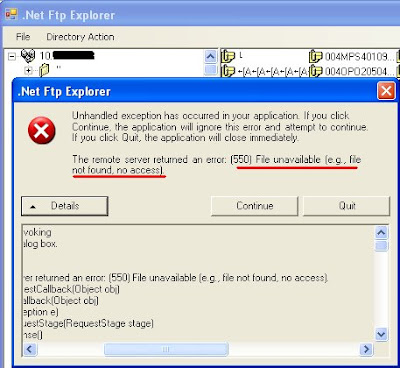
System.Net.WebException: The remote server returned an error: (550) File unavailable (e.g., file not found, no access).
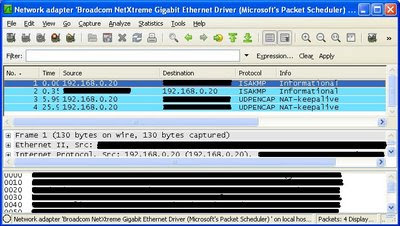
(See List of FTP server return codes) but I could do it without any problem using FileZilla. Excluding the problem might come from .NET framework, since FTP is under RFC 959, I was recommended by someone to use the WireShark, a Packet sniffer tool, to check the message sent and received between server and client.
- ABOR - abort a file transfer
- CWD - change working directory
- DELE - delete a remote file
- LIST - list remote files
- MDTM - return the modification time of a file
- MKD - make a remote directory
- NLST - name list of remote directory
- PASS - send password
- PASV - enter passive mode
- PORT - open a data port
- PWD - print working directory
- QUIT - terminate the connection
- RETR - retrieve a remote file
- RMD - remove a remote directory
- RNFR - rename from
- RNTO - rename to
- SITE - site-specific commands
- SIZE - return the size of a file
- STOR - store a file on the remote host
- TYPE - set transfer type
- USER - send username
System.Net.WebException: The remote server returned an error: (550) File unavailable (e.g., file not found, no access).
(See List of FTP server return codes) but I could do it without any problem using FileZilla. Excluding the problem might come from .NET framework, since FTP is under RFC 959, I was recommended by someone to use the WireShark, a Packet sniffer tool, to check the message sent and received between server and client.
I just realized that the FtpWebRequest class itself could not simply navigate to any path in the server if the default directory is not root path, since with WebRequestMethods.Ftp Members, you only got these raw commands that it wrapped (where's FTP CWD protocol ?):
- FTP APPE protocol
- FTP DELE protocol
- FTP RETR protocol
- FTP MDTM protocol
- FTP SIZE protocol
- FTP NLIST protocol
- FTP LIST protocol
- FTP MKD protocol
- FTP PWD protocol
- FTP RMD protocol
- FTP RENAME protocol
- FTP STOR protocol
- FTP STOU protocol
(Even using "PrintWorkingDirectory", only empty string returned)
From Mariya Atanasova's Blog:
The above example will bring you to your user's directory and list all the contents there. Now let's say you want to go 2 directories backwards and list the contents there (provided your user has permissions to do that). You close the previous FtpWebRequest and issue a new one with this uri
uri = "ftp://myFtpUserName:myFtpUserPassword@myFtpUrl/%2E%2E/%2E%2E";
This is equivalent to logging in with your user's credentials and then using cd ../../
But one strange thing: what if user (or even you, the developer) does not know the default directory and current directory? Then you might need WinINet Functions or even worst, go back to socket programming.
p/s: For those who prefer to have hand dirty, there's a free e-book available in scribd: TCP/IP Sockets in C# .
Thursday, September 25, 2008
Why we need different version of MSXML dlls installed?
While still supporting VB6 legacy system that reference to MSXML 4.0, user (and even layman like me) curious why some PCs have installed MSXML 6.0, yet still need to install MSXML 4.0 (or SP2). We thought this should have backward compatibility or new version should act as a superset of old version, as most of the Microsoft's products do.


From VB6 MSXML sample (you can get it here), if MSXML 4.0 is installed and "DllTest.dll" is registered and this app is ran, you will get:
if "DllTest.dll" is not registered on PC without MSXML 4.0 installed, you might get :
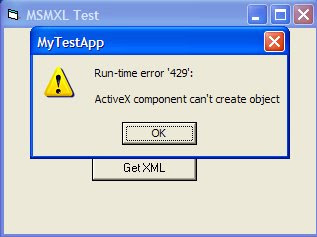 After "DllTest.dll" registration on PC without MSXML 4.0 installed, you will still get:
(you might get: "Object variable or With block variable not set" as well for some other cases)
From explanation of MSDN:
Version-Dependent ProgIDs
Prior to version 4.0 of MSXML, there was a notion of version independent ProgIDs. This meant that you could write a script that instantiated an instance of MSXML, and when a new version of MSXML was installed on your machine, you automatically would get the new version. However, this sometimes created problems. Replacing one version of MSXML with another version of MSXML created situations where the user's program would stop working due to changes in the programming interface.
Since version 4.0 of MSXML, each version has a unique ProgID for each interface in MSXML. This means that when you are using a scripting language, you will not suddenly be using a much newer version than you were previously. This is a much better approach - specifying exactly which version you want to run against, then coding specifically for that version, and being certain that the version would not change when the user updates their machine means that MSXML applications are much more reliable.
There is a situation where you will automatically be using MSXML version 3.0. If the computer that is fully patched uses MSXML as part of a web application in Internet Explorer using the MIME viewer, you automatically will be using MSXML 3.0. If you are using MSXML via a scripting language, and if you specify a version independent ProgID (such as Msxml2.DOMDocument), then you will be using MSXML 3.0. However, if you are using MSXML via a scripting language, and if you specify a version dependent ProgID (such as MSXML2.DOMDocument.6.0), then you will be using the version of MSXML corresponds to the specified ProgID.
Saturday, September 20, 2008
Windows OS 7: A milestone 3 (build 6780) release?
Time flies, now we have Windows OS 7 milestone 3 (build 6780) release. From the screenshots, we can see MS have revamped the MS WordPad, MS Paint, MS Calculator to a Office-like application. Soon, all the apps in OS 7 will be filled with ribbons. (Following images are external links from UX Evangelist, I hold no rights)


 Details of multi-touch technology is discussed here as well.
Wednesday, September 17, 2008
Codepage and Compression/DEFLATE
While data compression is great to reduce the file size/content significantly, the code-page of the PC will affect the compression/decompression or INFLATE/DEFLATE too. If you compress the data in code-page A, you might not able to get it back through de-compression in code-page B. Some of the compression algorithms involves Huffman coding(here), thus making byte-encoding significant.
Here's the sample code executed using zLib:
0) Within the same PC, INFLATE/DEFLATE is ok.

 2) DEFLATE under PC with code-page 936 (XP: Control Panel->Regional and Language Options), compare with what you get from (1) previously
(From wiki: A character is encoded as 1 or 2 bytes. A byte in the range 00–7F is a single byte that means the same thing as it does in ASCII. Strictly speaking, there are 96 characters and 32 control codes in this range.
A byte with the high bit set indicates that it is the first of 2 bytes. Loosely speaking, the first byte is in the range 81–FE (that is, never 80 or FF, and the second byte is 40–FE for some areas and 80–FE for others.)

 You can check your PC's code-page using Win API: GetACP.
You also can get the VC++ zLib sample here, and VB6 GetACP sample here.
Here's the sample code executed using zLib:
0) Within the same PC, INFLATE/DEFLATE is ok.

1) DEFLATE under PC with code-page 1252 (XP: Control Panel->Regional and Language Options), compare with what you get from (2) later
(From wiki: Windows-1252 is a character encoding of the Latin alphabet, used by default in the legacy components of Microsoft Windows in English and some other Western languages. It is one version within the group of Windows code pages.)
(From wiki: Windows-1252 is a character encoding of the Latin alphabet, used by default in the legacy components of Microsoft Windows in English and some other Western languages. It is one version within the group of Windows code pages.)
 2) DEFLATE under PC with code-page 936 (XP: Control Panel->Regional and Language Options), compare with what you get from (1) previously
(From wiki: A character is encoded as 1 or 2 bytes. A byte in the range 00–7F is a single byte that means the same thing as it does in ASCII. Strictly speaking, there are 96 characters and 32 control codes in this range.
A byte with the high bit set indicates that it is the first of 2 bytes. Loosely speaking, the first byte is in the range 81–FE (that is, never 80 or FF, and the second byte is 40–FE for some areas and 80–FE for others.)
 You can check your PC's code-page using Win API: GetACP.
You also can get the VC++ zLib sample here, and VB6 GetACP sample here.
Subscribe to:
Posts (Atom)