Showing posts with label T-SQL. Show all posts

Tuesday, November 12, 2013

Access Denied: XXX needs the following permission(s) to perform this action: View collection-level information

Due to some mis-understanding, my windows account in server that hosts TFS 2010 was deleted, thru 'Computer Management->System Tools->Local Users & Groups'. Then I found I got problem to log-in.


After I added my account back, I encountered this error message when connect to VS2010:

Access Denied: 'XXX\gan' needs the following permission(s) to perform this action: View collection-level information.


At the TFS server, I launched the "Team Foundation Server Administration Console", I found my windows account is still there. I know my account is not associated with TFS properly anymore.


From MSDN: Team Foundation Server Permissions, it got something to do with 'Project-Level Permissions':

Permission Name
Name at Command Line
Description
Create test runs
PUBLISH_TEST_RESULTS
Users who have this permission can add and remove test results and add or modify test runs for the team project.
Delete team project
DELETE
Users who have this permission can delete the project for which they have this permission from Team Foundation Server.
Delete test runs
DELETE_TEST_RESULTS
Users who have this permission can delete a scheduled test for this team project.
Edit project-level information
GENERIC_WRITE
Users who have this permission can edit project-level permissions for users and groups on Team Foundation Server.
Manage test configurations
MANAGE_TEST_CONFIGURATIONS
Users who have this permission can create and delete test configurations for this team project.
Manage test environments
MANAGE_TEST_ENVIRONMENTS
Users who have this permission can create and delete test environments for this team project.
View project-level information
GENERIC_READ
Users who have this permission can view project-level group membership and the permissions of those project users.
View test runs
VIEW_TEST_RESULTS
Users who have this permission can view test plans in this node.


Browsing from 'Source Control Explorer', I really got no idea whether is my account still there. Can you tell??


No choice, I have to remove and re-add. After adding my windows account in the "Team Foundation Server Administration Console->Administration Console Users-Add", no error logged but my windows account is not there.


I opened the log, and found there's an error.
[Info   @01:36:05.790] -+-+-+-+-+-+-+-+-+-+-+-+-+-+-+-+-+-+-+-+-+-+-+
[Info   @01:36:05.790] Running Readiness Checks ...

[Info   @01:36:05.790] -+-+-+-+-+-+-+-+-+-+-+-+-+-+-+-+-+-+-+-+-+-+-+

[Info   @01:36:05.791] 

[Info   @01:36:05.791] -+-+-+-+-+-+-+-+-+-+-+-+-+-+-+-+-+-+-+-+-+-+-+

[Info   @01:36:05.791] Activity.Verify

[Info   @01:36:05.792] -+-+-+-+-+-+-+-+-+-+-+-+-+-+-+-+-+-+-+-+-+-+-+

[Info   @01:36:05.797] Verify: AccountsChecks(VCONTAINER): Starting Verification

[Info   @01:36:05.797] A generic container node that does not contribute to results

[Info   @01:36:05.797] "Verify: AccountsChecks(VCONTAINER): Exiting Verification with state Ignore and result Ignore"

[Info   @01:36:05.798] Verify: AccountsChecks\Verify Accounts Feature(VCHANGEFEATURE): Starting Verification
[Info   @01:36:05.798] Verifies a condition
[Info   @01:36:05.798] "Verify: AccountsChecks\Verify Accounts Feature(VCHANGEFEATURE): Exiting Verification with state Completed and result Success"

[Info   @01:36:05.798] Verify: AccountsChecks\Verify Accounts Account(VACCOUNTVALID): Starting Verification

[Info   @01:36:05.798] Verifies the account is a valid account

[Info   @01:36:05.799] "Verify: AccountsChecks\Verify Accounts Account(VACCOUNTVALID): Exiting Verification with state Completed and result Success"

[Info   @01:36:05.799] Verify: AccountsChecks\SqlLogin(VSQLLOGIN): Starting Verification

[Info   @01:36:05.799] Verifies the given account does not already have a SQL login that is denied access or with the wrong SID

[Info   @01:36:05.801] Verifying SQL login of account XXX\gan does not exist on XXX\SqlExpress, or if it exists, it does not have a different SID and it is not denied access to the server.

[Error  @01:36:05.805] The login for the given account has the wrong SID.

[Error  @01:36:05.805] !Verify Error!: TF255441: An orphaned SQL Server login is associated with the following account: XXX\gan. The login has an incorrect security identifier (SID). The server selected to host the databases for Team Foundation Server is: XXX SqlExpress. You must delete the login from the SQL Server instance on that server.

[Info   @01:36:05.805] "Verify: AccountsChecks\SqlLogin(VSQLLOGIN): Exiting Verification with state Completed and result Error"

[Info   @01:36:05.805] Verify: AccountsChecks\DBExists(VDBEXISTS): Starting Verification

[Info   @01:36:05.805] Sql Database Existance Verification

[Info   @01:36:05.809] "Verify: AccountsChecks\DBExists(VDBEXISTS): Exiting Verification with state Completed and result Success"

[Info   @01:36:05.809] !Verify Result!: 4 Completed, 0 Skipped: 3 Success, 1 Errors, 0 Warning
Looks like TFS only cater an account when it does not exist, but it cannot re-create the account due to security issue.

So, I have to go to MSSQL-Express and remove my windows account.


You can check the DB used in 'Data Tier Summary' at "Team Foundation Server Administration Console" (more info at 'Team Foundation Server Databases'):


After adding my windows account again in the "Team Foundation Server Administration Console->Administration Console Users-Add", everything is ok!
[Info   @01:51:33.399] -+-+-+-+-+-+-+-+-+-+-+-+-+-+-+-+-+-+-+-+-+-+-+
[Info   @01:51:33.399] Adding account to collection databases ...

[Info   @01:51:33.399] -+-+-+-+-+-+-+-+-+-+-+-+-+-+-+-+-+-+-+-+-+-+-+

[Info   @01:51:33.400] Getting collections...
[Info   @01:51:33.401] Changing collection: DefaultCollection
[Info   @01:51:33.403] ConnectionString: Data Source=XXX\SqlExpress;Initial Catalog=Tfs_DefaultCollection;Integrated Security=True

[Info   @01:51:33.405] ModifyExecRole: Add:XXX\gan

[Info   @01:51:34.498] result: Success

[Info   @01:51:34.499] Added XXX\gan to Tfs_DefaultCollection (XXX\SqlExpress)

[Info   @01:51:34.499] Changing collection: YYY

[Info   @01:51:34.502] ConnectionString: Data Source=XXX\SqlExpress;Initial Catalog=Tfs_YYY;Integrated Security=True

[Info   @01:51:34.503] ModifyExecRole: Add:XXX\gan

[Info   @01:51:35.381] result: Success

[Info   @01:51:35.381] Added XXX\gan to Tfs_YYY (XXX\SqlExpress)

[Info   @01:51:35.388] ADDCOLLACCOUNT Completed.

[Info   @01:51:35.389] Starting Node: ADDSYSTEMDBACCOUNT

[Info   @01:51:35.389] Add account to system dbs

Done. (You might need to re-map your work-space after this)

Wednesday, June 5, 2013

Dynamic columns in listview

Creating a GridView with dynamic columns generated is easy, it even comes without much effort by simply configuring the AutoGenerateColumns Property. Some even can try to use Meta-Data.

However, creating a ListView with dynamic columns needs a bit of trick. Here's the ways:

1) First, we create a  Employee-vs-Vendor table, using the Common Table Expressions(CTE) and PIVOT. Left-join it we get the result in tabular form.


2) On the listview layout template, we have to declare a placeholder:


Employee vs Vendor


the CSS style used is to break the words if you specify too many columns.

3) Then in the ItemTemplate, we no need to add extra dynamic columns we want, since it's going to be done programmatically.


4) Depends on the level of the query, you have to create a nested ItemTemplate accordingly. I believe this can be done thru' AJAX. However, I leave this to the future.

5) Then when we start binds the query to the listview, we bind it level-by-level:

DataTable dt = new DataTable();
dt = ((DataTable)ViewState["cachedTable"]).Clone();

if (((DataTable)ViewState["cachedTable"]).Rows.Count > 0)
{
    DataRow[] drResults = ((DataTable)ViewState["cachedTable"]).Select("GENERATION = 0");

    foreach (DataRow dr in drResults)
    {
        object[] row = dr.ItemArray;
        dt.Rows.Add(row);
    }
}

lsvHighLvlFormAccess.DataSource = dt;
lsvHighLvlFormAccess.DataBind();

6) When highest level binding is done, we can populate the header caption. This is the part when you set the column-span & generate the column header dynamically.

protected void lsvHighLvlFormAccess_DataBound(object sender, EventArgs e)
{
    PlaceHolder phDynamicHdr = (PlaceHolder)lsvHighLvlFormAccess.FindControl("phDynamicHdr");
    // check phDynamicHdr.Controls.Count; could be called twice when postback
    if (phDynamicHdr != null /*&& phDynamicHdr.Controls.Count == 0*/)
    {
        Literal ltrl = new Literal();

        DataTable dt = ((DataTable)ViewState["cachedTable"]);
        if (dt != null && dt.Rows.Count > 0)
        {
            foreach (DataColumn dc in dt.Rows[0].Table.Columns)
            {
                if (!(dc.ColumnName.Equals("GENERATION") ||
                        dc.ColumnName.Equals("hierarchy") ||
                        dc.ColumnName.Equals("rowNo") ||
                        dc.ColumnName.Equals("EmployeeID")))
                {
                    if (dc.ColumnName.Equals("LoginID"))
                    {
                        ltrl.Text += "" + dc.ColumnName + "

";
                    }
                    else
                        ltrl.Text += "" + dc.ColumnName + "

";
                }
            }
        }

        if (phDynamicHdr.Controls.Count > 0)
        {
            // if current dynamic columns is different with exisiting dynamic columns 
            if (!((Literal)phDynamicHdr.Controls[0]).Text.Equals(ltrl.Text))
            {
                // remove the whole previous dynamic columns
                phDynamicHdr.Controls.Remove(phDynamicHdr.Controls[0]);
                // replace with new dynamic columns
                phDynamicHdr.Controls.Add(ltrl);
            }
        }
        else
            phDynamicHdr.Controls.Add(ltrl);
    }

    HtmlTableCell td = (HtmlTableCell)lsvHighLvlFormAccess.FindControl("imgCollapseExpand");
    if (td != null)
    {
        DataTable dt = ((DataTable)ViewState["cachedTable"]);
        if (dt != null && dt.Rows.Count > 0)
        {
            td.ColSpan = dt.Rows[0].Table.Columns.Count + I_COLSPAN - 1;//I_COLSPAN - 1 : to put the 'minus.png'
        }
    }
}

7) On each high-level row is bound, we need to fire the event to populate its descendant. Here, checkboxes are used. You can replace with any other control too.

protected void lsvHighLvlFormAccess_ItemDataBound(object sender, ListViewItemEventArgs e)
{
    HtmlTableRow row = (HtmlTableRow)e.Item.FindControl("row");
    // http://msdn.microsoft.com/en-us/library/system.web.ui.webcontrols.listviewdataitem.dataitem.aspx
    // http://forums.asp.net/t/1334142.aspx/1
    ListViewDataItem item = (ListViewDataItem)e.Item;
    System.Data.DataRowView drv = (System.Data.DataRowView)item.DataItem;

    dynamicPopulateRow(row, drv, 0);
 // more contents here
}

where dynamicPopulateRow() is:

private void dynamicPopulateRow(HtmlTableRow row, System.Data.DataRowView drv, int iGeneration)
{
    if (row != null)
    {
        // http://www.pcreview.co.uk/forums/do-enumerate-all-columns-dataviewrow-t1244448.html
        foreach (DataColumn dc in drv.Row.Table.Columns)
        {
            string sEmployeeID = drv["LoginID"].ToString();

            if (dc.ColumnName.Equals("LoginID"))
            {
                // http://msdn.microsoft.com/en-US/library/e5daxzcy(v=vs.80).aspx
                // Define a new HtmlTableCell control.
                HtmlTableCell cell = new HtmlTableCell("td");

                // Create the text for the cell.
                cell.Controls.Add(new LiteralControl(Convert.ToString(drv[dc.ColumnName])));
                cell.ColSpan = dc.ColumnName.Equals("LoginID") ? I_COLSPAN - iGeneration : 1;

                // Add the cell to the HtmlTableRow Cells collection. 
                row.Cells.Add(cell);
            }
            else if (!(dc.ColumnName.Equals("GENERATION") ||
                        dc.ColumnName.Equals("hierarchy") ||
                        dc.ColumnName.Equals("rowNo") ||
                        dc.ColumnName.Equals("EmployeeID")))
            {
                // http://msdn.microsoft.com/en-US/library/e5daxzcy(v=vs.80).aspx
                // Define a new HtmlTableCell control.
                HtmlTableCell cell = new HtmlTableCell("td");

                bool bIsNull = drv[dc.ColumnName] is System.DBNull;

                Literal ltrl = new Literal();
                ltrl.Text += " 0 ? " checked>" : ">");

                cell.Controls.Add(ltrl);
                // Add the cell to the HtmlTableRow Cells collection. 
                row.Cells.Add(cell);
            }
            else
            {
                //other rows
            }
        }
    }
}

8) If you more nested level, just add these codes:

var lst1stLevel = (ListView)e.Item.FindControl("lst1stLevel");
populateLV(lst1stLevel, 1, (string)drv["hierarchy"], Convert.ToInt32(drv["rowNo"]));

where populateLV() is:

private void populateLV(ListView lv, int iNextGeneration, string sHierarchy, int iCurrRowNo)
{
    if (lv != null)
    {
        DataTable dt = new DataTable();
        dt = ((DataTable)ViewState["cachedTable"]).Clone();// clone schema only

        List levels = ((DataTable)ViewState["cachedTable"]).
                            Select("GENERATION = " + (iNextGeneration > 0 ? iNextGeneration - 1 : 0) +
                            " AND hierarchy LIKE '" + sHierarchy + "%'"). // no space
                            AsEnumerable().
                            Select(al => Convert.ToInt32(al.Field("rowNo"))).Distinct().ToList();

        // duplicate hierarchy, display at smallest rowNo will do
        if (levels.Count > 0 && levels.Min() == iCurrRowNo)
        {
            DataRow[] drResults = ((DataTable)ViewState["cachedTable"]).
                                Select("GENERATION = " + iNextGeneration + " AND hierarchy LIKE '" + sHierarchy + " %'");

            foreach (DataRow dr in drResults)
            {
                object[] obRow = dr.ItemArray;
                dt.Rows.Add(obRow);
            }
            lv.DataSource = dt;
            lv.DataBind();
        }
    }
}

9) Repeat this for second-level, third-level, etc.

protected void lst2ndLevel_ItemDataBound(object sender, ListViewItemEventArgs e)
{
    HtmlTableRow row = (HtmlTableRow)e.Item.FindControl("row");
    ListViewDataItem item = (ListViewDataItem)e.Item;
    System.Data.DataRowView drv = (System.Data.DataRowView)item.DataItem;
    int iCurrLvl = 2;
    //populate dynamic cells
    dynamicPopulateRow(row, drv, iCurrLvl);

    //populate nested LV
    var lst3rdLevel = (ListView)e.Item.FindControl("lst3rdLevel");
    populateLV(lst3rdLevel, iCurrLvl + 1, (string)drv["hierarchy"], Convert.ToInt32(drv["rowNo"]));
}

10) Done. This is what it looks like in Visual Studio Designer. Press F5 to go.


11) if you choose 4 columns, you get this:


12) If you choose 10 columns, you get this:


13) Lastly, a whopping 55 columns.


You can get the source-code here (DynamicColumns_LV.zip).
You can download the AdventureWorks database through Microsoft Download Center.

Monday, March 4, 2013

ListView Grouping On Demand using AJAX and stored-procedure

Matt Berseth has a series of tutorials on building a Grouping Grid with the ASP.NET 3.5 LinqDataSource and ListView Controls. It's quite a good control that able to display the data in master-detail format.

While using LinQ can help you to encapsulate the database layer, it might incur additional workload. And not every coder can write good LinQ query, thus it turns out to be an ugly resource-hunger monster. Personally, i found it's not easy to fine-tune when u need to reduce the page loading time after the data grows huge, if compare with ADO .NET using stored-procedure. At least, you can analyse the execution plan.

You can reduce the page size through paging, but in some scenario, your client might prefer loading all the data in one time (a bit ridiculous though). Then AJAX comes into the picture.


Muhammad Mosa has a series of tutorials on Building a grouping Grid with GridView and ASP.NET AJAX toolkit CollapsiblePanel


By combining the two, we can create Grouping ListView using AJAX and stored procedure.
1) we create the stored procedure to create the grouping data, with the help of GROUPING SETS.

Select a.*, b.OrderDate, b.ShipName, 
c.FirstName + ' ' + c.LastName as fullName
from
(
 SELECT CASE WHEN (GROUPING(CustomerID) = 1) THEN NULL--'...'--'ALL CustomerID'
    ELSE ISNULL(CustomerID, 'UNKNOWN')
     END AS CustomerID,
     CASE WHEN (GROUPING(EmployeeID) = 1) THEN NULL--'...'--'ALL EmployeeID'
    ELSE ISNULL(EmployeeID, 'UNKNOWN')
     END AS EmployeeID,
     CASE WHEN (GROUPING(OrderID) = 1) THEN NULL--'ALL OrderID'
    ELSE ISNULL(OrderID, 'UNKNOWN')
     END AS OrderID,
     COUNT(*) as [itemCount],
     SUM(freight) AS totalFreight
 FROM #temp l
 GROUP BY GROUPING SETS
 (
  (CustomerID, EmployeeID, OrderID),
  (CustomerID, EmployeeID),
  (CustomerID),
  ()
 )
) a

2) Then we need a extended AJAX toolkit CollapsiblePanel from Muhammad Mosa's article.

3) Embed the newly extended CollapsiblePanel in the ItemTemplate of the host listview.

4) Next we need to invoke the nested listview through WebMethod.

[System.Web.Services.WebMethod()]
public static string GetEmployees(string sParams)
{
    Page page = new Page();
    // restart Casini build-in IIS if error 
    COM.UsrCtrl_nestedListView ctl = (COM.UsrCtrl_nestedListView)page.LoadControl(PAGE_EMPLOYEE);
    page.Controls.Add(ctl);
    ctl.Params = sParams;
    System.IO.StringWriter writer = new System.IO.StringWriter();
    HttpContext.Current.Server.Execute(page, writer, false);
    string output = writer.ToString();
    writer.Close();
    return output;
}

5) Eventually we have our final result.

Few things to take note:
i) ToolkitScriptManager has to enable the PageMethods


ii) Since host listView and nested listview are 2 separate html tables, we have to enforce the CSS table-layout Property.


You can get the source-code here (ListViewGrouping_OnDemand.zip).
You can download the Northwind database through Microsoft Download Center.
If you want to customize the CSS of the listView,  this article is a great place to start with.

Tuesday, August 9, 2011

Creating Linked-server in MSSQL

I come across a situation where I need to import the data from one instance to another, in MSSQL. So, I add the steps here to see it might help.

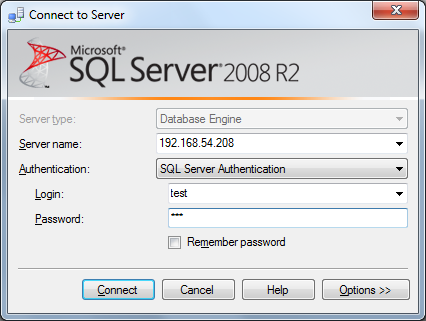
1) At source DB where we want to retrieve the data, create a new login account, eg. "test" with password "123".

2) Use the neccesary authetication, choose to untick "Enforce password policy" for our testing purpose.

3) If the db name in source DB is called "testing", maps the test account "test" to this db, with appropriate schema. In this case, it's "dbo". Add the role as "db_datareader" as well.

4) At destination DB where we want to store the data, create a same new login account created in step (1), eg. "test" with password "123", using SA account.

5) Use the neccesary authetication, choose to untick "Enforce password policy" for our testing purpose.

6) If the db name in destination DB is called "testDB", maps the test account "test" to this db, with appropriate schema. In this case, it's "dbo".

7) Add a linked-server in destination DB, you can either use SQL script or GUI.

8) You can verify the available linked-server in the destination DB, thru' Catalog Views: sys.servers

9) Now, log-in as "test" user.

10) So, you should be able to query the source DB data by using a fully-qualified name.

Tuesday, May 20, 2008

Cannot resolve the collation conflict on temporary table?

"Cannot resolve the collation conflict between "Collation_A" and "Collation_B" in the equal to operation."

When I am using MSSQL 2000, it's normal when I hit this kind of collation problem on physically-existed table. Either the source database is conflict with new database, due to an upgrade from older version of customized database, or from other production site from different country.

But recently, I hit this issue at Temporary Tables (because I changed a new job and performed a new installation on my company laptop).

Let's say you have a following scripts written at stored procedure(SP):

-- Use AdventureWorks
create table #tempTable (ID int IDENTITY(1,1) NOT NULL ,
column1 varchar(200) NOT NULL)
INSERT INTO #tempTable
Values('test')
create table tempTable (ID int IDENTITY(1,1) NOT NULL ,
column2 varchar(200) NOT NULL)
INSERT INTO tempTable
Values('test')
Select * from #tempTable t
inner join tempTable p
on t.ID = p.ID
where t.column1 = p.column2

--drop table #tempTable
--drop table tempTable

and when you execute it, you will get the following error message:

Msg 468, Level 16, State 9, Line 10
Cannot resolve the collation conflict between "SQL_Latin1_General_CP1_CI_AS" and "Latin1_General_CI_AS" in the equal to operation.

At the first look, I was confused what went wrong. ( Of course you can suggest assign the associate collation will do, but what if there's tons of SP you need to modify? And even worst, they are decrypted!)

Of course the best practice would be something like this:

CREATE TABLE #TestTempTab
(PrimaryKey int PRIMARY KEY,
Col1 nchar COLLATE database_default
)

as in Setting and Changing the Column Collation, but I doubt most people do that.

So first I traced down from the definition of the Temporary Tables. From MSDN:

You can create local and global temporary tables. Local temporary tables are visible only in the current session; global temporary tables are visible to all sessions. Prefix local temporary table names with single number sign (#table_name), and prefix global temporary table names with a double number sign (##table_name).
...
The full name of a temporary table as stored in the sysobjects table in tempdb consists of table name specified in the CREATE TABLE statement and the system-generated numeric suffix.

I queried from tempdb at System Databases with this query: (Note: you must use "Like" statement for the name)
use tempdb
Select collation, * from sysobjects so
inner join syscolumns sc
on so.id = sc.id
where so.name like '#tempTable%'


Why? Why it's collated in "Latin1_General_CI_AS"? Then I checked the database collation for this "tempdb" database and server instance:


Why all in "Latin1_General_CI_AS" collation? Then I went through the screenshot I took when I installed the MSSQL 2005 Developer Edition long long time ago (I have a habit to store the installation settings for future purpose, as in this case), I found this:


I switched the collation to Collation designator, which default to "Latin1_General_CI_AS" collation, as in my OS culture! I just realized I misused the in-appropriated collation with the current database (in this case "AdventureWorks", which uses "SQL_Latin1_General_CP1_CI_AS" collation.


So now, what is the solution?
I thought the faster way should be alter the "tempdb" database collation like this :

or from script:

USE [master]
GO
ALTER DATABASE [tempdb] COLLATE SQL_Latin1_General_CP1_CI_AS
GO

But I get this error message:


I searched the MSDN/BOL, and I found this: Setting and Changing the Server Collation
So I inserted my installer in CD-ROM and tried to use this command:


start /wait setup.exe /qb INSTANCENAME={my SS2005 instance name} REINSTALL=SQL_Engine REBUILDDATABASE=1 SAPWD={my SS2005 instance sa password} SQLCOLLATION=SQL_Latin1_General_CP1_CI_AI

but the wizard came and went but nothing happened:

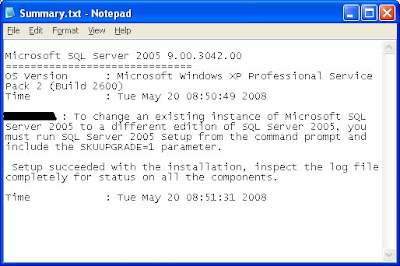
So I tried to look at the summary.txt produced, as suggested in SQL Server 2005 Setup Log File. Nothing too!
Then "SQLSetup0011_(pcName)_Core.log":


Eventually I uninstalled it. Haha.

Saturday, January 12, 2008

Trivial but also Tricky : Result of using "is NULL" & "= NULL" in T-SQL is different

For the T-SQL (here I use MS-SQL), especially when you write stored procedure, you will normally receive parameter(s) from .NET/Java or any equivalent language to manipulate your client records. This is a normal design of three-tier application (Presentation Layer represents the UI that interact with user; Business Logic layer to code all your business logic; Data Access layer to deal with various kind of data storage apps)

For these received parameters, normally you will use some of it to retrieve (or perform checking or validation) some other data from other tables. You will write any T-SQL to perform SIUD(Select/Insert/Update/Delete) on records based on the business logic in database. In order to SUID on these records, your WHERE-statement must be written precisely, and of concisely. If the WHERE-statement is wrong, then the records SUID-ed will be corrupted.

Let's have simple example:
1) Create a simple table with nullable columns

if exists (select * from dbo.sysobjects where id = object_id(N'[dbo].[_Test]') and
OBJECTPROPERTY(id, N'IsUserTable') = 1)drop table [dbo].[_Test]
GO

CREATE TABLE [dbo].[_Test] (
[col1] [varchar] (100) COLLATE SQL_Latin1_General_CP1_CI_AS NULL ,
[status] [int] NULL ) ON [PRIMARY]
GO

2) Insert 2 sample records into it
insert into _Test(col1, status)
values('First row', NULL)

insert into _Test(col1, status)
values('Second row', 1)
3) Create a stored procedure to determine the record could be found in database or not

IF EXISTS (Select * from sysobjects where name = '_spTest' and xtype = 'P')
DROP PROCEDURE _spTest
GO
CREATE PROCEDURE dbo._spTest
@p1 int
As
IF EXISTS ( Select * from _Test where status = @p1)
PRINT 'Records found !'
ELSE
PRINT 'No records found !'
GO

4) Now try to execute it

execute _spTest 1
execute _spTest NULL

Oh, where's another records?

6) And this is quoted from MSSQL BOL (Book On-Line) / T-SQL Reference:
To determine if an expression is NULL, use IS NULL or IS NOT NULL rather than comparison operators (such as = or !=). Comparison operators return UNKNOWN if either or both arguments are NULL.

Now, you realized you used the comparison operators to execute it unknowingly!

7) So, in order to access the particular data accurately, the correct stored procedure should be written (Of course, this is simple scripts only, COALESCE or any other keywords can help you to SIUD the huge records efficiently) as

IF EXISTS (Select * from sysobjects where name = '_spTest' and xtype = 'P')
DROP PROCEDURE _spTest
GO

CREATE PROCEDURE dbo._spTest
@p1 int
As
IF (@p1 IS NULL)
BEGIN
IF EXISTS ( Select * from _Test where status IS NULL)
PRINT 'Records found, with status is null!'
ELSE
PRINT 'No records found with status is null!'
END
ELSE
BEGIN
IF EXISTS ( Select * from _Test where status = @p1)
PRINT 'Records found!'
ELSE
PRINT 'No records found!'
END
GO

8) Now try to execute it again

execute _spTest 1
execute _spTest NULL
9) Correct!