Nowadays, javascript development is getting broader in web development.
Either on front-end (JQuery, KnockoutJS, TypeScript, etc) or back-end (Node.js, ect), more libraries are created with more compact, more light-weight.
11) Create a folder called "lib" in folder "a" and another file called "b.js" (this is the file mentioned above in "package.json"; see code below) in folder "lib":
console.log('module b initializing...');
var PI = Math.PI;

exports.area = function (r) {
  return PI * r * r;
};

exports.circumference = function (r) {
  return 2 * PI * r;
};
console.log('b initialized.');
Creating a GridView with dynamic columns generated is easy, it even comes without much effort by simply configuring the AutoGenerateColumns Property. Some even can try to use Meta-Data.
However, creating a ListView with dynamic columns needs a bit of trick. Here's the ways:
1) First, we create a Employee-vs-Vendor table, using the Common Table Expressions(CTE) and PIVOT. Left-join it we get the result in tabular form.
2) On the listview layout template, we have to declare a placeholder:
Employee vs Vendor
the CSS style used is to break the words if you specify too many columns.
3) Then in the ItemTemplate, we no need to add extra dynamic columns we want, since it's going to be done programmatically.
4) Depends on the level of the query, you have to create a nested ItemTemplate accordingly. I believe this can be done thru' AJAX. However, I leave this to the future.
5) Then when we start binds the query to the listview, we bind it level-by-level:
DataTable dt = new DataTable();
dt = ((DataTable)ViewState["cachedTable"]).Clone();

if (((DataTable)ViewState["cachedTable"]).Rows.Count > 0)
{
    DataRow[] drResults = ((DataTable)ViewState["cachedTable"]).Select("GENERATION = 0");

    foreach (DataRow dr in drResults)
    {
        object[] row = dr.ItemArray;
        dt.Rows.Add(row);
    }
}

lsvHighLvlFormAccess.DataSource = dt;
lsvHighLvlFormAccess.DataBind();
6) When highest level binding is done, we can populate the header caption. This is the part when you set the column-span & generate the column header dynamically.
protected void lsvHighLvlFormAccess_DataBound(object sender, EventArgs e)
{
    PlaceHolder phDynamicHdr = (PlaceHolder)lsvHighLvlFormAccess.FindControl("phDynamicHdr");
    // check phDynamicHdr.Controls.Count; could be called twice when postback
    if (phDynamicHdr != null /*&& phDynamicHdr.Controls.Count == 0*/)
    {
        Literal ltrl = new Literal();

        DataTable dt = ((DataTable)ViewState["cachedTable"]);
        if (dt != null && dt.Rows.Count > 0)
        {
            foreach (DataColumn dc in dt.Rows[0].Table.Columns)
            {
                if (!(dc.ColumnName.Equals("GENERATION") ||
                        dc.ColumnName.Equals("hierarchy") ||
                        dc.ColumnName.Equals("rowNo") ||
                        dc.ColumnName.Equals("EmployeeID")))
                {
                    if (dc.ColumnName.Equals("LoginID"))
                    {
                        ltrl.Text += "" + dc.ColumnName + "

";
                    }
                    else
                        ltrl.Text += "" + dc.ColumnName + "

";
                }
            }
        }

        if (phDynamicHdr.Controls.Count > 0)
        {
            // if current dynamic columns is different with exisiting dynamic columns
            if (!((Literal)phDynamicHdr.Controls[0]).Text.Equals(ltrl.Text))
            {
                // remove the whole previous dynamic columns
                phDynamicHdr.Controls.Remove(phDynamicHdr.Controls[0]);
                // replace with new dynamic columns
                phDynamicHdr.Controls.Add(ltrl);
            }
        }
        else
            phDynamicHdr.Controls.Add(ltrl);
    }

    HtmlTableCell td = (HtmlTableCell)lsvHighLvlFormAccess.FindControl("imgCollapseExpand");
    if (td != null)
    {
        DataTable dt = ((DataTable)ViewState["cachedTable"]);
        if (dt != null && dt.Rows.Count > 0)
        {
            td.ColSpan = dt.Rows[0].Table.Columns.Count + I_COLSPAN - 1;//I_COLSPAN - 1 : to put the 'minus.png'
        }
    }
}
7) On each high-level row is bound, we need to fire the event to populate its descendant. Here, checkboxes are used. You can replace with any other control too.
Quite frequently we need to find a specific word from a large chunk of string. With more focus on web development and the advancement of client-side scripting capability, more efforts have to focus on javascript nowadays.
I came across with this and bump into these 2 methods, both methods look identical (almost) to me to achieve what I was looking for.
search()
indexOf()
I thought they can achieve the same result, but eventually they aren't.
First, let's use the search() to perform some testing.
Test 1: Using the w3schools's Tryit Editor with default function to search "W3Schools":
function myFunction()
{
var str="Visit W3Schools!";
var n=str.search("W3Schools");
document.getElementById("demo").innerHTML=n;
}
You'll get result:
6 (which is correct)
Test 2: then use another method indexOf() on the same function to search same string [MUST click "Submit Code" after change in "Tryit Editor"]:
function myFunction()
{
var str="Visit W3Schools!";
var n=str.indexOf("W3Schools");
document.getElementById("demo").innerHTML=n;
}
You'll get result:
6 (which is correct too)
Nothing fancy, nothing wrong.
OK, what about change the string to search from "W3Schools" to "W3|Schools" (adding a "|" character, since it's frequently used as a delimiter)
Test 3: if using search() method [MUST click "Submit Code" after change in "Tryit Editor"]:
function myFunction()
{
var str="Visit W3Schools!";
var n=str.search("W3|Schools");
document.getElementById("demo").innerHTML=n;
}
You'll get result:
6 (which is wrong)
Test 4: if using indexOf() method [MUST click "Submit Code" after change in "Tryit Editor"]:
function myFunction()
{
var str="Visit W3Schools!";
var n=str.indexOf("W3|Schools");
document.getElementById("demo").innerHTML=n;
}
You'll get result:
-1 (which is still correct)
From Test 3 & Test 4, you get different result if the string your search contains special character "|". Looking back, I was overlooked by its definition (see fonts in read).
search() Method: The search() method searches a string for a specified value, or regular expression, and returns the position of the match. This method returns -1 if no match is found.
indexOf() Method: The indexOf() method returns the position of the first occurrence of a specified value in a string. This method returns -1 if the value to search for never occurs.
Looks like special character "|" has caused some effect on the regular expression and need special treatment on it. Lesson learnt.
There'll be time when you need to enabling SSL on IIS 7.0 Using Self-Signed Certificates. RobBagby & scottgu has 2 great tutorials on that topic. Looks like IIS7 simplify a lots.
I go to IIS and set the binding using the default port 443.
But life is not always a bed of roses.Then I hit this error message:
"There was an error while performing this operation."
"The process cannot access the file because it is being used by another process. (Exception from HRESULT: 0x80070020)"
I was wonder what caused it to happen After confirmed with network guy it's not their issue, i have to check what could be the possible reason for that.
From Microsoft Support, and also someone from stack-overflow pointed out this could be port is being used by other application.
Then I work it out from there:
1) run the "netstat" command from command prompt, to display active TCP connections, ports on which the computer is listening
2) then run the "Tasks Manager". The PID column is not displyed by default. I have to go to "View">"Select Column" and check it.
3) Compare the PID.
4) there's another process, called "nhttp.exe" is using that port. It's from Lotus Domino. :(
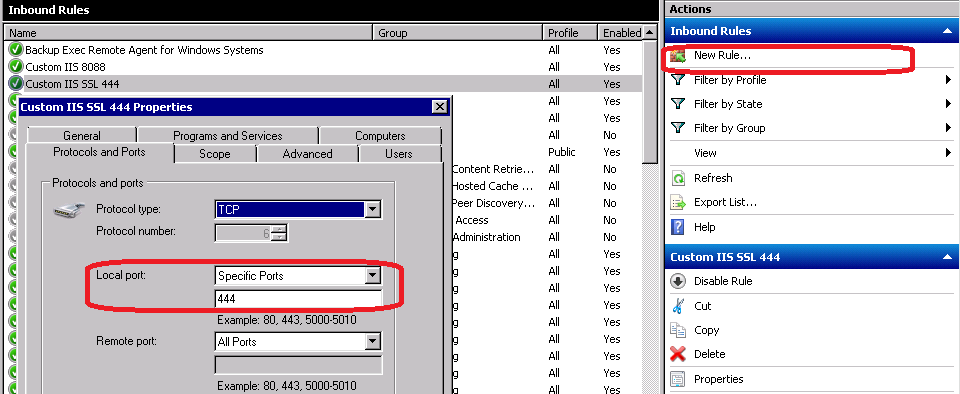
5) no choice but have to use another port 444. Back to the IIS site binding, and edit it.
6) of course, have to allow the firewall to let that port through by adding a new inbound rule.
While using LinQ can help you to encapsulate the database layer, it might incur additional workload. And not every coder can write good LinQ query, thus it turns out to be an ugly resource-hunger monster. Personally, i found it's not easy to fine-tune when u need to reduce the page loading time after the data grows huge, if compare with ADO .NET using stored-procedure. At least, you can analyse the execution plan.
You can reduce the page size through paging, but in some scenario, your client might prefer loading all the data in one time (a bit ridiculous though). Then AJAX comes into the picture.
By combining the two, we can create Grouping ListView using AJAX and stored procedure.
1) we create the stored procedure to create the grouping data, with the help of GROUPING SETS.
Select a.*, b.OrderDate, b.ShipName,
c.FirstName + ' ' + c.LastName as fullName
from
(
 SELECT CASE WHEN (GROUPING(CustomerID) = 1) THEN NULL--'...'--'ALL CustomerID'
    ELSE ISNULL(CustomerID, 'UNKNOWN')
     END AS CustomerID,
     CASE WHEN (GROUPING(EmployeeID) = 1) THEN NULL--'...'--'ALL EmployeeID'
    ELSE ISNULL(EmployeeID, 'UNKNOWN')
     END AS EmployeeID,
     CASE WHEN (GROUPING(OrderID) = 1) THEN NULL--'ALL OrderID'
    ELSE ISNULL(OrderID, 'UNKNOWN')
     END AS OrderID,
     COUNT(*) as [itemCount],
     SUM(freight) AS totalFreight
 FROM #temp l
 GROUP BY GROUPING SETS
 (
  (CustomerID, EmployeeID, OrderID),
  (CustomerID, EmployeeID),
  (CustomerID),
  ()
 )
) a